Light House Laser Engrave File: Premium PNG Design
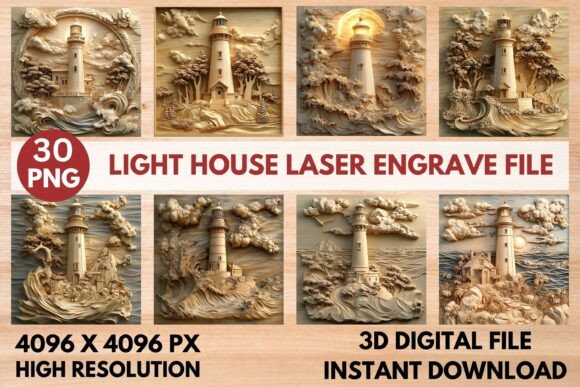
Imagine transforming a simple piece of wood or slate into a stunning piece of art with the flick of a laser. That's the magic of a well-crafted laser engrave file, and the Light House Laser Engrave File is designed to make that transformation seamless and professional. This isn't just a single image; it's a comprehensive toolkit for creators, offering 15 unique grayscale and coloring PNGs at a high resolution of 4096x4096 pixels, all optimized for popular laser engraving machines.
Why This File Stands Out for Your Projects
What makes this design asset so valuable is its versatility and quality. Each PNG file is crafted with a transparent background and is specifically prepared for laser engraving, ensuring crisp, detailed results on a variety of materials. Whether you're working with Glowforge, LightBurn, xTool, or other CO2 laser cutting machines, the files are ready to print. The included Glowforge recommended settings and LightBurn dither filter instructions remove the guesswork, allowing you to achieve smooth, professional-grade engravings from the start.
Practical Applications for Creators and Makers
The true appeal of this file lies in its wide range of creative uses. It's perfect for more than just a single project; it's a resource you can return to again and again. Consider using it for:
- Home Décor & Wood Crafts: Create personalized signs, coasters, wall art, or decorative boxes with intricate lighthouse designs.
- Custom Stationery & Packaging: Add a unique, tactile element to wedding invitations, business cards, or branded product packaging.
- Fashion & Textiles: Engrave detailed patterns onto leather for accessories or create custom textile prints.
- Tableware & Gifts: Personalize cutting boards, slate cheese boards, or acrylic awards for memorable gifts or sale items.
The Light House Laser Engrave File – Premium PNG essentially provides a library of high-quality design assets. The combination of coloring and grayscale PNGs offers flexibility—use the coloring files for sublimation or other print projects, and the optimized grayscale files for direct laser engraving.
Tips for Selecting and Using Digital Design Assets
When choosing any digital file for your work, a few key considerations ensure success. First, always verify the file format and resolution match your project's needs; high-resolution PNGs like these are essential for large-format or detailed engraving. Second, consider the mood and style of the design. A lighthouse motif conveys a sense of guidance, stability, and classic charm, making it suitable for both rustic and contemporary aesthetics. Finally, understand the license. This file is for digital use, meaning you can use the engraved outcomes commercially, but you cannot resell the digital file itself.
Investing in a premium, ready-to-use file like this saves valuable time in design preparation. Instead of starting from scratch or cleaning up low-quality images, you can focus on the creative process—choosing the perfect material, adjusting your machine's settings, and watching your vision come to life. The right design asset elevates the final product, enhancing visual consistency and adding a professional polish that customers and recipients will notice.
Ultimately, having a reliable library of high-quality design assets is a game-changer for any maker or designer. It streamlines workflow, inspires new ideas, and ensures a consistently high standard of output. The Light House Laser Engrave File is more than just an image; it's a versatile tool designed to help you create beautiful, lasting pieces with confidence and ease.